Author Archives: Anil Kumar Pugalia

About Anil Kumar Pugalia

The author is a hobbyist in open source hardware and software, with a passion for mathematics, and philosopher in thoughts. A gold medallist from the Indian Institute of Science, Linux, mathematics and knowledge sharing are few of his passions. He experiments with Linux and embedded systems to share his learnings through his weekend workshops. Learn more about him and his experiments at https://sysplay.in.

Integrated Circuits

This 5th article in the series of “Do It Yourself: Electronics”, kick starts you with an overview of some commonly used integrated circuits aka ICs.

<< Previous Article

Out of the computer programming lab, Pugs headed towards the recently launched Innovation Garage. As he entered there, he saw many crazy geeks playing around with various stuff – not only software but electronics and mechanical stuff, as well. Pugs was super excited seeing all these around him – as if a dream come true – a multi disciplinary lab. He felt as if why not spend my whole time here – but sigh those classes, assignments, lab records, … won’t let him do that. “Why can’t there be only labs for just doing stuff, and that also without being to write lab records?”, Pugs murmured to himself.

“O! You are already here”, exclaimed Surya, as he entered the garage.

“Yes. It is so exciting”, replied Pugs.

“So, what are you planning to innovate on?”

“No idea. Just wondering. Don’t know where to start from.”

“That is simple. Just start from something you have been working on.”

“You mean to say the electronics experiment you taught me.”

“Yes – why not?”

“But that is too simple hobby stuff, for innovation.”

“So what? That’s where you start simple, and then gradually build complex stuff using them, and then more complex stuff using those complex stuff.”

“Something like writing our own functions, and then writing more complex functions using those functions, and so on.”

“You’d always need a software analogy”, sighed Surya. “Yes, you can say something like that.”

“Okay then, is there something like standard library functions, with some pre-built functionality, which can be directly used without bothering about what’s being done inside it?”

“Exactly! You stole my words. ICs are exactly those.”

“Now what is this IC? I know one – inferiority complex.”

“No. It stands for Integrated Circuits. Yes, they may give you IC (inferiority complex), by showing their capabilities”, responded Surya with a laugh.

“O! that would be cool.”

“What would be cool?”, asked Surya with a surprise look.

“Tomorrow is my first day to the Integrated Circuits Lab, and you just told me what an IC is – a standard library function. So, I can go and play around with them, tomorrow.”

“Yes, you can really have lot of fun – create electronic circuits faster and in better ways.”

“But, I have a doubt.”

“What?”

“Do you have ‘man’ pages for the ICs, like we have for the standard library functions?”

“Yes, that’s where the datasheets come into action. Those are like the man pages, giving you the various usage details of the corresponding IC.”

“And those I need to get from the net, right?”

“Yes.”

“But, how do I know, which IC should I be using where?”

“For that I can give you a kickstarter overview. And, then you would keep on finding more as the need arises.”

“O! sure.”

Kickstarter by Surya:

“Aha! So, we have been already using some of these ICs, and now you tell me that they are called ICs”, was Pugs’ response to the overview.

“That is called enlightenment”, laughed out Surya. “By the way, let me know your first IC lab experience.”

Next Article >>

   Send article as PDF   

Water Level Indicator

This 4th article in the series of “Do It Yourself: Electronics”, takes you through using a bipolar junction transistor (BJT), as an electronic switch.

<< Previous Article

Pugs came out of the “Electronics Fundamentals” class, all loaded with internal details of a transistor. He was lost in his own world, when he crossed ways with Surya coming out of his class. Surya called Pugs, without any response. So, he came close and shook Pugs, “Hey Pugs! Where are you?”

Pugs, as if he woke up from deep sleep, “Hey! What happened? Where are you going?”

“Where were you lost? Whom were you remembering? Shall I call Simi?”

“Hey! Shut up yaar. Where did she come in between? I was thinking of how to use the transistors in a practical way”, replied Pugs showing anger.

“Okay. Okay. Cool down. I was just joking. So, today your class was about transistors.”

“Yes.”

“Last time when you went to buy some components, I asked you to get four BC546 transistors, right?”

“Yes. I got them.”

“So now, I think is the time to experiment with them, to bring you back from the lost world.”

“O Great! But you know what, if I remember correct, the shopkeeper didn’t have BC546, and so he gave some other number, saying that is equivalent.”

“Which number?”

“Not really sure.”

“No probs. Let’s go to your room and check it out.”

Both Surya and Pugs walks down to Pugs’ room.

Pugs took out the transistors, trying to check the number written on them.

“Looks like BC548. Can you check, Surya?”

“Yes it is BC548. That’s fine. In fact, BC546 & BC547 are same as BC548, except that they have higher break down voltages. Moreover, there are other variants as well, like BC549 – a low noise variant, BC550 – with both low noise and higher break down voltage.”

“I don’t understand your all these Greek-Latin – just tell me if what I got is okay.”

“Ya ya that’s fine. It is also NPN like the others.”

“Yes, that I understand – meaning there is a very thin layer with concentrated holes sandwiched between two layers with concentrated electrons, and so the electrons are the majority carriers in these kinds.”

“O! That’s great – you know quite a bit about them. Hmmm! I see the effect of the class”, said Surya staring at Pugs.

Interrupting Surya’s stare, Pugs said, “Ignore that, and tell me then, do we also have similar PNP transistors?”

“Yes. There is a similar series BC556 to BC560 for PNP transistors.”

“Hmmm! So now, what are we planning to do with these four BC548’s.”

“Use them as electronic switches for water level indication.”

And then goes the demonstration by Surya:

“Hey Surya! You have put the power line into the water. Isn’t that dangerous?”

“It is just 5 volts, Pugs. And more than that the current would be in micro amps, as it is the input to the base of the transistors.”

“I see. And that can be ignored – too small to observe in this noisy world.”

“With water, yes. However, with hazardous liquids like petrol, even that may not be okay.”

Next Article >>

   Send article as PDF   

Sensing Someone Around

This 3rd article in the series of “Do It Yourself: Electronics”, takes you through the basics of infra red sensing using an IR LED and an IR diode.

<< Previous Article

Early morning, Pugs went to the ECE Department to meet Surya, who was creating some experiments for his juniors.

“What are you doing at this time in your department lab?”, exclaimed Pugs to Surya.

“Setting up a robot framework for our ECE juniors, for the robotic showcase planned for today afternoon”, replied Surya

“Interesting. I see that you are also using the IR transmitter and the IR receiver, you asked me to buy. By the name itself, I can make out that one would transmit IR signals, and other would receive the same. But what could we use them for?”

“These can be used for a wide range of applications …”

“To me it seems like another light sensor. Sun also emits IR. So, may be we can detect presence of sun”, interrupted Pugs.

“Why only sun? Even our bodies are good source of IR”, added Surya.

“Okay. So, do we detect sunlight, living beings, etc using the IR receiver? But then what is the IR transmitter for?”

“We can detect, but for that we may need more sophistication to eliminate the unwanted IRs. Anyways, the purpose here is not that. It is more of obstacle detection, and that’s where, we need this IR transmitter, as well.”

“I see. So, how do these IR Tx & Rx pair work?”

“Let me just show you a small working demo of the same.”

With that Surya picked up the various stuff needed, from around the lab, and showed the following:

Pugs went to his room & rebuilt the circuit. But to his surprise, the LED was always on. He tried debugging it, as in his previous light sensing circuit, but in vain. So, in frustration, he called up Surya and said, “Surya, your debugging gyaan is not working out. I tried all your suggested debugging tricks, but not able to figure out the problem in my circuit”.

“What happened? Have you powered up your circuit?”, queried Surya.

“Yes obviously. And that’s what the problem is. In my circuit, the LED is now always powered on”, replied Pugs with a sarcastic voice.

“Where have you put the circuit?”, asked Surya.

“On my table. Where else?”

“Put it below the table, and check out.”

“Why are you joking with me? How does it matter, whether I put it above or below the table?”

“Just try it, na”, emphasized Surya.

So, unwillingly Pugs put his circuit below the table, and viola the LED went off. And then, when he hovered his hand over the circuit, the LED switched on. He couldn’t believe himself. So, he tried the same multiple times. Then, he also put back the circuit on the table to check the problem, again. And yes, it was there. But all fine, when below the table.

“What happened Pugs? Did it work?”, asked Surya, as he didn’t receive any response from Pugs for a while.

“Yaaa. It is working. But how?”

“Now as it is working, I can explain you. Remember, you only told me that sun also emits IR, and your table is near the window. So, the IR receiver was always getting the IR, and hence LED was always on.”

“A ha! That’s cool. So, when I put it below the table – no IR from the sun – and things worked. That’s a great insight, that when we are playing with real world stuff, we need to keep our minds and thoughts open to all possibilities.”

“In fact, there is a simpler way to fix this problem. But I thought, why not have this fun experience.”

“What’s that?”, asked Pugs curiously.

“You may just adjust the pot to appropriately set the threshold value, depending on where you are keeping your circuit.”

“O ya! That’s what we have put the pot for.”

Next Article >>

   Send article as PDF   

Sensing the Light Around

This 2nd article in the series of “Do It Yourself: Electronics”, starts with the journey of sensors.

<< Previous Article

After attending their regular afternoon classes, Surya & Pugs met near the Innovation Centre, headed towards their hostel rooms.

“What a waste of energy!”, exclaimed Surya pointing out to the street lights glowing on in the bright day.

“Possibly the switch man is not well and couldn’t come to switch off the lights”, said Pugs calming Surya.

“But, why do you need a switch man for switching on and off street lights?”, retorted Surya.

“What do you mean?”, asked Pugs with a puzzled look.

“These could be made automatic – what else?”

“Switch man may be more cost-effective than automating all these street lights.”

“I don’t think so – given that it can be achieved by simple & cheap electronic circuitry.”

“O Really! Then, why don’t we make and give it to the college? And, I can learn a new circuit.”

“Not a bad idea. Let us then first make a working sample.”

With that Pugs followed Surya into his room to watch the design evolve.

“By the way, what kind of circuit would it be?”, asked Pugs curiously.

“Think and you tell me. That is the first part of the design”, replied Surya.

Pugs contemplated a while and said “Something which switches off when sunlight is there.”

“Not bad. In fact, it should also switch on when light is less. And, that’s a light sensing circuit.”

“But how do we sense light electronically?”

“Why only light? A whole lot of stuff around us can be sensed using components called sensors. They come in whole variety, converting one form of energy into an another. And in electronics, we would like to use those that some how translates the energy into voltage. We have light sensors, sound sensors, humidity sensors, … – you name it.”

“Wow! So, then we can automate all kind of things.”

“Yes. That’s the power & beauty of sensors.”

With that, Surya takes out the light dependent resistor (LDR) and various other components needed for designing the light sensing circuit. And, here is how he demonstrated the complete design and working to Pugs:

As soon as Surya was done, Pugs quipped “That was simple. Even I can do it, now.”

“Exactly, that’s what I was telling you”, boosted Surya, dismantling the so built breadboard design.

“Hey, why are you breaking it?”, asked Pugs trying to stop Surya.

“That was simple. And so now you design it”, replied Surya challenging Pugs to redo the design on his own.

Pugs took up the challenge, and started building the circuit. He used the following two pointers from the notes taken by him during Surya’s demo:

LDR Circuit

LDR Circuit

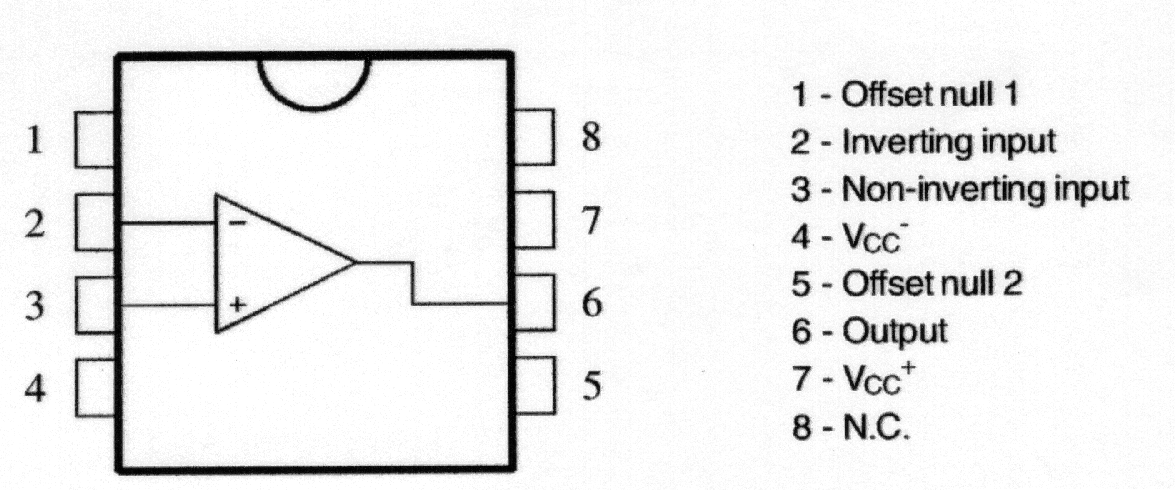
741 OpAmp Pinout

741 OpAmp Pinout

He took some time but was able to build a similar circuit. However, to his surprise, it was not working. He tried tightening the ICs, shaking the wires – but no luck. Not wanting to give up his first circuit design challenge, he said “Hey Surya, I feel that circuit connections are okay, but something else is wrong. In programming, if we are not getting output, we can debug our program by putting prints. Is there something like that, I can do here as well?”

Surya gave a naughty smile understanding Pugs’ intention of not giving up, and poked “So, do you want me to debug it for you?”

“No-no. You just tell me the techniques of debugging. I’ll do it myself”, retorted Pugs.

“Okay then. Let me give you a quick debugging demo of possibilities” – and here’s what Surya showed to Pugs:

With that, Pugs was literally able to debug his circuit, and get the LED switch on when light is there and switch off when light is covered. “Aha! that’s not quite right. The logic is inverted”, exclaimed Pugs. At this, Surya couldn’t control himself, and quipped, “Yes. That’s because you have swapped the -ve and +ve connections of the Opamp.”

With that, Pugs reversed the connections and viola – everything was working right.

Super excited with the light sensing gyan from Surya, Pugs went to the local market to purchase the various components to build his own circuits. He purchased all the stuff shown to him by Surya till now, and then called up Surya asking what else shall he purchase, may be for his next circuit experiment. Surya suggested him to get an infra red transmit LED, an infra red receive diode, and four BC546 transistors.

Next Article >>

   Send article as PDF   

Building Circuits from Scratch

This is all about “Do It Yourself: Electronics”, as how it started between two college friends from NIT Warangal.

“Oh! It was a total tangential lecture today”, sighed Pugs in the cafeteria.

“Why? What happened Pugs? What was it about?”, asked Surya.

“Electronics Fundamentals, yaar”, replied Pugs.

“But, why in this world have you chosen that elective, you being a comps guy?”, asked Surya with curiosity.

“I wish to design some electronic circuits of my own. So thought, that might be helpful.”

“That sounds interesting. But I can understand, what would you have felt in the lecture. BTW, what was the topic today?”

“Don’t ask me yaar. All these electrons moving around, then these imaginary holes, the potential barriers, and what not. After initial 5 minutes, I was totally lost.”

“You know what? You don’t really need to know all these gory details to design basic electronic circuits. And moreover, you should go by the top-down approach to fulfill your wish.”

“O really! And what is this top-down approach”, exclaimed Pugs.

“What I mean is that you should first start playing with the various electronics components, understand their practical usages by designing simple breadboard circuits. And, then go into the gory details, if necessary”, explained Surya.

“That’s wonderful. Design the circuits first. Cool!! … But how do I start? I don’t have any clue about what components, etc”

“That’s easy. I can give you a practical hands-on kick-starter.”

“That’s great Surya. I hope after that I’d be able to start designing circuits, and may be able to make sense out of the lectures, as well.”

“Ya sure Pugs. Let’s go to my room. I have various electronics stuff there to get you started.”

“Just an idea. I know, I am going to get an amazing kick-starter, and there may be many more like me. So, why not record your kick-starter.”

“Hey! No yaar. It is just for you”, Surya replied shyly, thinking of the public exposure.

“Come on Surya. Think of it. Your knowledge sharing could benefit so many.”

“Hmmm!! …”

“Don’t think so much. I know that would thrill you. Let me get the photography club guys to film it.”

All set in Surya’s room, he took out his various electronics stuff, and started explaining them to Pugs, as follows:

Pugs was all excited after this first level of kick-starter by Surya, and requested Surya to show the video on resistor colour coding, as well.

Here is what Surya showed on his laptop:

“I understood what all you showed me. But how do I use the various things?”, queried Pugs. “Okay. So, I’ll now show you the simplest electronics circuit – ‘Blinking an LED'”, replied Surya. And, here is what he did:

“That was really simple. Something like the ‘Hello World’ program we write, when we start learning a programming language”, expressed Pugs. “Exactly, that’s what it is in the electronics world – blinking an LED”, confirmed Surya.

“Chalo Pugs, let’s go for lunch”, said Surya, trying to shutdown his laptop. Pugs interrupted, “Ay no Surya. Just before we go for lunch, I have a small doubt”. “Ya, tell me”, asked Surya. “Theoretically, you explained to me about the various current, voltage, resistor values from the datasheets etc, and then built the circuit. Do this circuit, really have those values?”, doubted Pugs. “What do you think?” asked Surya. “If you are asking means should be, otherwise how would the circuit work.”, Pugs tried to confirm with Surya. “Yes and No. They would be close to those values but not exact – and that is what is practical about it – to be tolerant about the tolerances. To drive the point home, I think, let me show you the actual readings using a Digital MultiMeter (DMM)”. And with that, Surya demonstrated the following measurements:

Next Article >>

   Send article as PDF   

The Semester Project – Part VII: File System in Action

This twenty-fourth article, which is part of the series on Linux device drivers, gets the complete real SIMULA file system module in action, with a real hardware partition on your pen drive.

<< Twenty-third Article

Real SFS in action

Code available from rsfs_in_action_code.tbz2 gets to the final tested implementation of the final semester project of Pugs & Shweta. This contains the following:

  • real_sfs.c – contains the code of earlier real_sfs_minimal.c plus the remaining real SIMULA file system functionalities. Note the file system’s name change from sfs to real_sfs
  • real_sfs_ops.c & real_sfs_ops.h – contains the earlier code plus the additional operations needed for the enhanced real_sfs.c implementations
  • real_sfs_ds.h (almost same file as in the previous article, plus a spin lock added into the real SFS info structure to be used for preventing race conditions in accessing the used_blocks array in the same structure)
  • format_real_sfs.c (same file as in the previous articles) – the real SFS formatter application
  • Makefile – contains the rules for building the driver real_sfs_final.ko using the real_sfs_*.* files, and the format_real_sfs application using the format_real_sfs.c

With all these and earlier details, Shweta completed their project documentation. And so finally, Shweta & Pugs were all set for their final semester project demo, presentation and viva.

The highlights of their demo (on root shell) are as follows:

  • Loading real_sfs_final driver: insmod real_sfs_final.ko
  • Using the previously formatted pen drive partition /dev/sdb1 or Re-formatting it using the format_real_sfs application: ./format_real_sfs /dev/sdb1. Caution: Please check out the complete detailed steps on this from the previous article, before you actually format it
  • Mount the real SFS formatted partition: mount -t real_sfs /dev/sdb1 /mnt
  • And … And what? Browse the mounting filesystem. Use your usual shell commands to operate on the file system: ls, cd, touch, vi, rm, chmod, …

Figure 40 shows the real SIMULA file system in action

Figure 40: The real SIMULA file system module in action

Figure 40: The real SIMULA file system module in action

Realities behind the action

And if you really want to know, what are the additional enhancements Pugs added to the previous article’s code to get to this level, it is basically the following core system calls as part of the remaining 4 out of 5 set of structures of function pointers (in real_sfs.c):

  1. write_inode (under struct super_operations) – sfs_write_inode() basically gets a pointer to an inode in the VFS’ inode cache, and is expected to sync that with the inode in physical hardware space file system. That is achieved by calling the appropriately modified sfs_update() (defined in real_sfs_ops.c) (adapted from the earlier browse_real_sfs application). The key parameter changes being passing the inode number instead of the filename and the actual timestamp instead of the flag for its update status. And accordingly, the call to filename based sfs_lookup() is being replaced by inode number based sfs_get_file_entry() (defined in real_sfs_ops.c), and additionally now the data blocks are also being freed (using sfs_put_data_block() (defined in real_sfs_ops.c)), if the file size has reduced. Note that sfs_put_data_block() (defined in real_sfs_ops.c) is a transformation of the put_data_block() from the browse_real_sfs application. Also, note the interesting mapping to / from the VFS inode number from / to our zero-based file entry indices, using the macros S2V_INODE_NUM() / V2S_INODE_NUM() in real_sfs_ops.h.
    And finally, underlying write is being achieved using write_to_real_sfs(), a function added in real_sfs_ops.c, very similar to read_from_real_sfs() (already there in real_sfs_ops.c), except the direction reversal of the data transfer and marking the buffer dirty to be synced up with the physical content. Alongwith, in real_sfs_ops.c, two wrapper functions read_entry_from_real_sfs() (using read_from_real_sfs()) and write_entry_to_real_sfs() (using write_to_real_sfs()) have been written and used respectively for the specific requirements of reading and writing the file entries, to increase the code readability. sfs_write_inode() and sfs_update() are shown in the code snippet below. sfs_write_inode() has been written in the file real_sfs.c. For others, check out the file real_sfs_ops.c
#if (LINUX_VERSION_CODE < KERNEL_VERSION(2,6,34))
static int sfs_write_inode(struct inode *inode, int do_sync)
#else
static int sfs_write_inode(struct inode *inode, struct writeback_control *wbc)
#endif
{
	sfs_info_t *info = (sfs_info_t *)(inode->i_sb->s_fs_info);
	int size, timestamp, perms;

	printk(KERN_INFO "sfs: sfs_write_inode (i_ino = %ld)\n", inode->i_ino);

	if (!(S_ISREG(inode->i_mode))) // Real SFS deals only with regular files
		return 0;

	size = i_size_read(inode);
	timestamp = inode->i_mtime.tv_sec > inode->i_ctime.tv_sec ?
			inode->i_mtime.tv_sec : inode->i_ctime.tv_sec;
	perms = 0;
	perms |= (inode->i_mode & (S_IRUSR | S_IRGRP | S_IROTH)) ? 4 : 0;
	perms |= (inode->i_mode & (S_IWUSR | S_IWGRP | S_IWOTH)) ? 2 : 0;
	perms |= (inode->i_mode & (S_IXUSR | S_IXGRP | S_IXOTH)) ? 1 : 0;

	printk(KERN_INFO "sfs: sfs_write_inode with %d bytes @ %d secs w/ %o\n",
		size, timestamp, perms);

	return sfs_update(info, inode->i_ino, &size, &timestamp, &perms);
}

int sfs_update(sfs_info_t *info, int vfs_ino, int *size, int *timestamp, int *perms)
{
	sfs_file_entry_t fe; 
	int i;
	int retval;

	if ((retval = sfs_get_file_entry(info, vfs_ino, &fe)) < 0) 
	{   
		return retval; 
	}   
	if (size) fe.size = *size;
	if (timestamp) fe.timestamp = *timestamp;
	if (perms && (*perms <= 07)) fe.perms = *perms;

	for (i = (fe.size + info->sb.block_size - 1) / info->sb.block_size;
		i < SIMULA_FS_DATA_BLOCK_CNT; i++)
	{   
		if (fe.blocks[i])
		{   
			sfs_put_data_block(info, fe.blocks[i]);
			fe.blocks[i] = 0;
		}   
	}   

	return write_entry_to_real_sfs(info, V2S_INODE_NUM(vfs_ino), &fe);
}
  1. create, unlink, lookup (under struct inode_operations) – All the 3 functions sfs_inode_create(), sfs_inode_unlink(), sfs_inode_lookup() have the 2 common parameters (the parent’s inode pointer and the pointer to the directory entry for the file in consideration), and these respectively create, delete, and lookup an inode corresponding to their directory entry pointed by their parameter, say dentry.
    sfs_inode_lookup() basically searches for the existence of the filename underneath using the appropriately modified sfs_lookup() (defined in real_sfs_ops.c) (adapted from the earlier browse_real_sfs application – the adoption being replacing the user space lseek()+read() combo by the read_entry_from_real_sfs()). If filename is not found, then it invokes the generic kernel function d_splice_alias() to create a new inode entry in the underlying file system, for the same, and then attaches it to the directory entry pointed by dentry. Otherwise, it just attaches the inode from VFS’ inode cache (using generic kernel function d_add()). This inode, if obtained fresh (I_NEW), needs to be filled in with the real SFS looked up file attributes. In all the above implementations and in those to come, a few basic assumptions have been made, namely:

    • Real SFS maintains mode only for user and that is mapped to all 3 of user, group, other of the VFS inode
    • Real SFS maintains only one timestamp and that is mapped to all 3 of created, modified, accessed times of the VFS inode.

    sfs_inode_create() and sfs_inode_unlink() correspondingly invokes the transformed sfs_create() and sfs_remove() (defined in real_sfs_ops.c) (adapted from the earlier browse_real_sfs application), for respectively creating and clearing the inode entries at the underlying hardware space file system, apart from the usual inode cache operations, using new_inode()+insert_inode_locked(), d_instantiate() & inode_dec_link_count(), instead of the earlier learnt iget_locked(), d_add(). Apart from the permissions and file entry parameters, and replacing lseek()+read() combo by read_entry_from_real_sfs(), sfs_create() has an interesting transformation from user space to kernel space: time(NULL) to get_seconds(). And in both of sfs_create() and sfs_remove() the user space lseek()+write() combo has been replaced by the obvious write_entry_to_real_sfs(). Check out all the above mentioned code pieces in the files real_sfs.c and real_sfs_ops.c, as mentioned.

  2. readpage, write_begin, writepage, write_end (under struct address_space_operations) – All these address space operations are basically to read and write blocks on the underlying filesystem, and are achieved using the respective generic kernel functions mpage_readpage(), block_write_begin(), block_write_full_page(), generic_write_end(). First one is prototyped in <linux/mpage.h> and remaining 3 in <linux/buffer_head.h>. Now, though these functions are generic enough, a little thought would show that the first three of these would ultimately have to do a real SFS specific transaction with the underlying block device (the hardware partition), using the corresponding block layer APIs. And that exactly is achieved by the real SFS specific function sfs_get_block(), which is being passed into and used by the first three functions, mentioned above.
    sfs_get_block() (defined in real_sfs.c) is invoked to read a particular block number (iblock) of a file (denoted by an inode), into a buffer head (bh_result), optionally fetching (allocating) a new block. So for that, the block array of corresponding real SFS inode is looked up into and then the corresponding block of the physical partition is fetched using the kernel API map_bh(). Again note that to fetch a new block, we invoke the sfs_get_data_block() (defined in real_sfs_ops.c), which is again a transformation of the get_data_block() from the browse_real_sfs application. Also, in case of a new block allocation, the real SFS inode is also updated underneath, using sfs_update_file_entry() – a one liner implementation in real_sfs_ops.c. Code snippet below shows the sfs_get_block() implementation.
static int sfs_get_block(struct inode *inode, sector_t iblock,
				struct buffer_head *bh_result, int create)
{
	struct super_block *sb = inode->i_sb;
	sfs_info_t *info = (sfs_info_t *)(sb->s_fs_info);
	sfs_file_entry_t fe;
	sector_t phys;
	int retval;

	printk(KERN_INFO "sfs: sfs_get_block called for I: %ld, B: %llu, C: %d\n",
		inode->i_ino, (unsigned long long)(iblock), create);

	if (iblock >= SIMULA_FS_DATA_BLOCK_CNT)
	{
		return -ENOSPC;
	}
	if ((retval = sfs_get_file_entry(info, inode->i_ino, &fe)) < 0)
	{
		return retval;
	}
	if (!fe.blocks[iblock])
	{
		if (!create)
		{
			return -EIO;
		}
		else
		{
			if ((fe.blocks[iblock] = sfs_get_data_block(info)) ==
				INV_BLOCK)
			{
				return -ENOSPC;
			}
			if ((retval = sfs_update_file_entry(info, inode->i_ino, &fe))
				< 0) 
			{   
				return retval;
			}
		}
	}
	phys = fe.blocks[iblock];
	map_bh(bh_result, sb, phys);

	return 0;
}
  1. open, release, read, write, aio_read/read_iter (since kernel v3.16), aio_write/write_iter (since kernel v3.16), fsync (under a regular file’s struct file_operations) – All these operations should basically go through the buffer cache, i.e. should be implemented using the address space operations. And this being a common requirement, the kernel provides a generic set of kernel APIs, namely generic_file_open(), do_sync_read()/new_sync_read() (since kernel v3.16), do_sync_write()/new_sync_write() (since kernel v3.16), generic_file_aio_read()/generic_file_read_iter() (since kernel v3.16), generic_file_aio_write()/generic_file_write_iter() (since kernel v3.16), simple_sync_file()/noop_fsync() (since kernel v2.6.35). Moreover, the address space operations read & write are no longer required to be given since kernel v4.1. Note that there is no API for release, as it is a ‘return 0‘ API. Check out the real_sfs.c file for the exact definition of struct file_operations sfs_fops.
  2. readdir/iterate (since kernel v3.11) (under a directory’s struct file_operations) – sfs_readdir()/sfs_iterate() primarily reads the directory entries of an underlying directory (denoted by file), and fills it up into the VFS directory entry cache (pointed by dirent parameter) using the parameter function filldir, or into the directory context (pointed by ctx parameter) (since kernel v3.11).
    As real SFS has only one directory, the top one, this function basically fills up the directory entry cache with directory entries for all the files in the underlying file system, using the transformed sfs_list() (defined in real_sfs_ops.c), adapted from the browse_real_sfs application. Check out the real_sfs.c file for the complete sfs_readdir()/sfs_iterate() implementation, which starts with filling directory entries for ‘.‘ (current directory) and ‘..‘ (parent directory) using parameter function filldir(), or generic kernel function dir_emit_dots() (since kernel v3.11), and then for all the files of the real SFS, using sfs_list().
  3. put_super (under struct super_operations) – The previous custom implementation sfs_kill_sb() (pointed by kill_sb) has been enhanced by separating it into the custom part being put into sfs_put_super() (and now pointed by put_super), and the standard kill_block_super() being directly pointed by kill_sb. Check out the file real_sfs.c for all these changes.

With all these in place, one could see the amazing demo by Pugs in action, as shown in Figure 40. And don’t forget watching the live log in /var/log/messages using a ‘tail -f /var/log/messages‘, matching it with every command you issue on the mounted real SFS file system. This would give you the best insight into when does which system call gets called. Or, in other words which application invokes which system call from the file system front. For tracing all the system calls invoked by an application/command, use strace with the command, e.g. type ‘strace ls‘ instead of just ‘ls‘.

Notes

  1. On distros like Ubuntu, you may find the log under /var/log/syslog instead of /var/log/messages
   Send article as PDF   

Playing with Graphs

This twenty-fourth article of the mathematical journey through open source, demonstrates the concepts of graph theory for playing with graphs using the graphs package of Maxima.

<< Twenty-third Article

In our previous article, we familiarized ourselves with the notion of simple graphs, and how graphs package of Maxima allows us to create and visualize them. Assuming that knowledge, in this article, we are going to play with graphs and their properties, using the functionalities provided by Maxima’s graphs package.

Graph modifications

We have already created various graphs with create_graph() and make_graph() functions of the graphs package of Maxima. What if we want to modify some existing graphs, say by adding or removing some edges or vertices? Exactly for such operations, Maxima provides the following functions:

  • add_edge(<edge>, <g>) – Adds <edge> into the graph <g>
  • add_edges(<edge_list>, <g>) – Adds edges specified by <edge_list> into the graph <g>
  • add_vertex(<vertex>, <g>) – Adds <vertex> into the graph <g>
  • add_vertices(<vertex_list>, <g>) – Adds vertices specified by <vertex_list> into the graph <g>
  • connect_vertices(<u_list>, <v_list>, <g>) – Connects all vertices from <u_list> to all vertices in <v_list> in the graph <g>
  • contract_edge(<edge>, <g>) – Merges the vertices of the <edge> and the edges incident on those vertices, in the graph <g>
  • remove_edge(<edge>, <g>) – Removes the <edge> from the graph <g>
  • remove_vertex(<vertex>, <g>) – Removes the <vertex> and the associated edges from the graph <g>

Some of the above functions are demonstrated below:

$ maxima -q
(%i1) load(graphs)$ /* Loading the graphs package */
...
0 errors, 0 warnings
(%i2) g: create_graph(4, [[0, 1], [0, 2]]);
(%o2)                     GRAPH(4 vertices, 2 edges)
(%i3) print_graph(g)$

Graph on 4 vertices with 2 edges.
Adjacencies:
  3 :
  2 :  0
  1 :  0
  0 :  2  1
(%i4) add_edge([1, 2], g)$
(%i5) print_graph(g)$

Graph on 4 vertices with 3 edges.
Adjacencies:
  3 :
  2 :  1  0
  1 :  2  0
  0 :  2  1
(%i6) contract_edge([0, 1], g)$
(%i7) print_graph(g)$

Graph on 3 vertices with 1 edges.
Adjacencies:
  3 :
  2 :  0
  0 :  2

In the above examples, if we do not intend to modify the original graph, we may make a copy of it using copy_graph(), and then operate on the copy, as follows:

(%i8) h: copy_graph(g);
(%o8)                     GRAPH(3 vertices, 1 edges)
(%i9) add_vertex(1, h)$
(%i10) print_graph(h)$

Graph on 4 vertices with 1 edges.
Adjacencies:
  1 :
  0 :  2
  2 :  0
  3 :
(%i11) print_graph(g)$ /* Notice g is unmodified */

Graph on 3 vertices with 1 edges.
Adjacencies:
  3 :
  2 :  0
  0 :  2
(%i12) quit();

Advanced graph creations

New graphs can also be created based on existing graphs and their properties by various interesting operations. Few of them are:

  • underlying_graph(<dg>) – Returns the underlying graph of the directed graph <dg>
  • complement_graph(<g>) – Returns the complement graph of graph <g>
  • line_graph(<g>) – Returns a graph that represents the adjacencies between the edges of graph <g>
  • graph_union(<g1>, <g2>) – Returns a graph with edges and vertices of both graphs <g1> and <g2>
  • graph_product(<g1>, <g2>) – Returns the Cartesian product of graphs <g1> and <g2>

Here are some examples to demonstrate the simpler functions:

$ maxima -q
(%i1) load(graphs)$
...
0 errors, 0 warnings
(%i2) g: create_graph(4, [[0, 1], [0, 2], [0, 3]], directed = true);
(%o2)                     DIGRAPH(4 vertices, 3 arcs)
(%i3) print_graph(g)$

Digraph on 4 vertices with 3 arcs.
Adjacencies:
  3 :
  2 :
  1 :
  0 :  3  2  1
(%i4) h: underlying_graph(g);
(%o4)                     GRAPH(4 vertices, 3 edges)
(%i5) print_graph(h)$

Graph on 4 vertices with 3 edges.
Adjacencies:
  0 :  1  2  3
  1 :  0
  2 :  0
  3 :  0
(%i6) print_graph(complement_graph(h))$

Graph on 4 vertices with 3 edges.
Adjacencies:
  3 :  2  1
  2 :  3  1
  1 :  3  2
  0 :
(%i7) print_graph(graph_union(h, complement_graph(h)))$

Graph on 8 vertices with 6 edges.
Adjacencies:
  4 :
  5 :  6  7
  6 :  5  7
  7 :  5  6
  3 :  0
  2 :  0
  1 :  0
  0 :  3  2  1
(%i8) quit();

Basic graph properties

graph_order(<g>), vertices(<g>) returns the number of vertices and the list of vertices, respectively, in the graph <g>. graph_size(<g>), edges(<g>) returns the number of edges and the list of edges, respectively, in the graph <g>.

A graph is a collection of vertices and edges. Hence, most of its properties are centred around them. The following are graph related predicates provided by the graphs package of Maxima:

  • is_graph(<g>) – returns true if <g> is a graph, false otherwise
  • is_digraph(<g>) – returns true if <g> is a directed graph, false otherwise
  • is_graph_or_digraph(<g>) – returns true if <g> is a graph or a directed graph, false otherwise
  • is_connected(<g>) – returns true if graph <g> is connected, false otherwise
  • is_planar(<g>) – returns true if graph <g> can be placed on a plane without its edges crossing over each other, false otherwise
  • is_tree(<g>) – returns true if graph <g> has no simple cycles, false otherwise
  • is_biconnected(<g>) – returns true if graph <g> will remain connected even after removal of any one its vertices and the edges incident on that vertex, false otherwise
  • is_bipartite(<g>) – returns true if graph <g> is bipartite, i.e. 2-colourable, false otherwise
  • is_isomorphic(<g1>, <g2>) – returns true if graphs <g1> and <g2> have the same number of vertices and are connected in the same way, false otherwise. And, isomorphism(<g1>, <g2>) returns an isomorphism (that is a one-to-one onto mapping) between the graphs <g1> and <g2>, if it exists.
  • is_edge_in_graph(<edge>, <g>) – returns true if <edge> is in graph <g>, false otherwise
  • is_vertex_in_graph(<vertex>, <g>) – returns true if <vertex> is in graph <g>, false otherwise

The following example specifically demonstrates the isomorphism property, from the list above:

$ maxima -q
(%i1) load(graphs)$
...
0 errors, 0 warnings
(%i2) g1: create_graph(3, [[0, 1], [0, 2]]);
(%o2)                     GRAPH(3 vertices, 2 edges)
(%i3) g2: create_graph(3, [[1, 2], [0, 2]]);
(%o3)                     GRAPH(3 vertices, 2 edges)
(%i4) is_isomorphic(g1, g2);
(%o4)                                true
(%i5) isomorphism(g1, g2);
(%o5)                      [2 -> 0, 1 -> 1, 0 -> 2]
(%i6) quit();

Graph neighbourhoods

Lot of properties of graphs are to do with vertex and edge neighbourhoods, also referred as adjacencies.

For example, a graph itself could be represented by an adjacency list or matrix, which specifies the vertices adjacent to the various vertices in the graph. adjacency_matrix(<g>) returns the adjacency matrix of the graph <g>.

Number of edges incident on a vertex is called the valency or degree of the vertex, and could be obtained using vertex_degree(<v>, <g>). degree_sequence(<g>) returns the list of degrees of all the vertices of the graph <g>. In case of a directed graph, the degrees could be segregated as in-degree and out-degree, as per the edges incident into and out of the vertex, respectively. vertex_in_degree(<v>, <dg>) and vertex_out_degree(<v>, <dg>) respectively return the in-degree and out-degree for the vertex <v> of the directed graph <dg>.

neighbors(<v>, <g>), in_neighbors(<v>, <dg>), out_neighbors(<v>, <dg>) respectively return the list of adjacent vertices, adjacent in-vertices, adjacent out-vertices of the vertex <v> in the corresponding graphs.

average_degree(<g>) computes the average of degrees of all the vertices of the graph <g>. max_degree(<g>) finds the maximal degree of vertices of the graph <g>, and returns one such vertex alongwith. min_degree(<g>) finds the minimal degree of vertices of the graph <g>, and returns one such vertex alongwith.

Here follows a neighbourhood related demonstration:

$ maxima -q
(%i1) load(graphs)$
...
0 errors, 0 warnings
(%i2) g: create_graph(4, [[0, 1], [0, 2], [0, 3], [1, 2]]);
(%o2)                     GRAPH(4 vertices, 4 edges)
(%i3) string(adjacency_matrix(g)); /* string for output in single line */
(%o3)           matrix([0,0,0,1],[0,0,1,1],[0,1,0,1],[1,1,1,0])
(%i4) degree_sequence(g);
(%o4)                            [1, 2, 2, 3]
(%i5) average_degree(g);
(%o5)                                  2
(%i6) neighbors(0, g);
(%o6)                              [3, 2, 1]
(%i7) quit();

Graph connectivity

A graph is ultimately about connections, and hence lots of graph properties are centred around connectivity.

vertex_connectivity(<g>) returns the minimum number of vertices that need to be removed from the graph <g> to make the graph <g> disconnected. Similarly, edge_connectivity(<g>) returns the minimum number of edges that need to be removed from the graph <g> to make the graph <g> disconnected.

vertex_distance(<u>, <v>, <g>) returns the length of the shortest path between the vertices <u> and <v> in the graph <g>. The actual path could be obtained using shortest_path(<u>, <v>, <g>).

girth(<g>) returns the length of the shortest cycle in graph <g>.

vertex_eccentricity(<v>, <g>) returns the maximum of the vertex distances of vertex <v> with any other vertex in the connected graph <g>.

diameter(<g>) returns the maximum of the vertex eccentricities of all the vertices in the connected graph <g>.

radius(<g>) returns the minimum of the vertex eccentricities of all the vertices in the connected graph <g>.

graph_center(<g>) returns the list of vertices that have eccentricities equal to the radius of the connected graph <g>.

graph_periphery(<g>) is the list of vertices that have eccentricities equal to the diameter of the connected graph.

A minimal connectivity related demonstration for the graph shown in Figure 29 follows:

$ maxima -q
(%i1) load(graphs)$
...
0 errors, 0 warnings
(%i2) g: create_graph(9, [[0, 1], [0, 2], [1, 8], [8, 3], [2, 3], [3, 4], [4, 5],
        [3, 6], [3, 7]]);
(%o2)                     GRAPH(9 vertices, 9 edges)
(%i3) vertex_connectivity(g);
(%o3)                                  1
(%i4) edge_connectivity(g);
(%o4)                                 1
(%i5) shortest_path(0, 7, g);
(%o5)                           [0, 2, 3, 7]
(%i6) vertex_distance(0, 7, g);
(%o6)                                 3
(%i7) girth(g);
(%o7)                                 5
(%i8) diameter(g);
(%o8)                                 4
(%i9) radius(g);
(%o9)                                 2
(%i10) graph_center(g);
(%o10)                                [3]
(%i11) graph_periphery(g);
(%o11)                             [5, 1, 0]
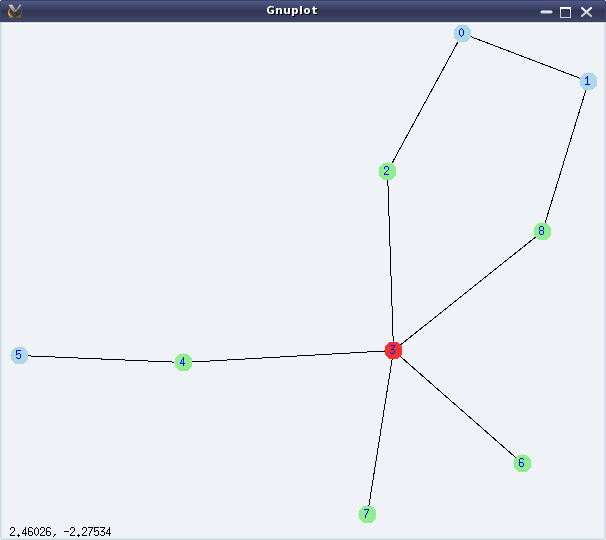
Figure 29: Graph connectivities

Figure 29: Graph connectivities

Vertex 3 is the only centre of the graph and 0, 1, 5 are the peripheral vertices of the graph.

Graph colouring

Graph colouring has been a fascinating topic in graph theory, since its inception. It is all about colouring the vertices or edges of a graph in such a way that no adjacent elements (vertex or edge) have the same colour.

Smallest number of colours needed to colour the vertices of a graph, such that no two adjacent vertices have the same colour, is called the chromatic number of the graph. chromatic_number(<g>) computes the same. vertex_coloring(<g>) returns a list representing the colouring of the vertices of <g>, along with the chromatic number.

Smallest number of colours needed to colour the edges of a graph, such that no two adjacent edges have the same colour, is called the chromatic index of the graph. chromatic_index(<g>) computes the same. edge_coloring(<g>) returns a list representing the colouring of the edges of <g>, along with the chromatic index.

The following demonstration continues colouring the graph from the above demonstration:

(%i12) chromatic_number(g);
(%o12)                                 3
(%i13) vc: vertex_coloring(g);
(%o13) [3, [[0, 3], [1, 1], [2, 2], [3, 1], [4, 2], [5, 1], [6, 2], [7, 2], [8, 2]]]
(%i14) chromatic_index(g);
(%o14)                                 5
(%i15) ec: edge_coloring(g);
(%o15) [5, [[[0, 1], 1], [[0, 2], 2], [[1, 8], 2], [[3, 8], 5], [[2, 3], 1], 
                           [[3, 4], 2], [[4, 5], 1], [[3, 6], 3], [[3, 7], 4]]]
(%i16) draw_graph(g, vertex_coloring=vc, edge_coloring=ec, vertex_size=5,
        edge_width=3, show_id=true)$
(%i17) quit();

Figure 30 shows the coloured version of the graph, as obtained by %i16.
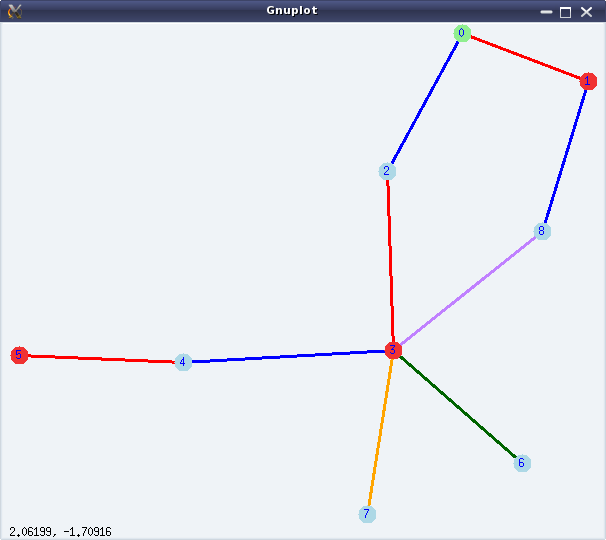
Figure 30: Graph colouring

Figure 30: Graph colouring

Bon voyage

With this article, we have completed a 2 year long mathematical journey through open source, starting from mathematics in Shell, covering Bench Calculator, Octave, and finally concluding with Maxima. I take this opportunity to thank my readers and wish them bon voyage with whatever they have gained through our interactions. However, this is not the end – get set for our next odyssey.

   Send article as PDF   

The Semester Project – Part VI: File System on Block Device

This twenty-third article, which is part of the series on Linux device drivers, enhances the previously written bare bone file system module, to connect with a real hardware partition.

<< Twenty-second Article

Since the last bare bone file system, the first thing which Pugs figured out was how to read from the underlying block device. Following is a typical way of doing it:

struct buffer_head *bh;

bh = sb_bread(sb, block); /* sb is the struct super_block pointer */
// bh->b_data contains the data
// Once done, bh should be released using:
brelse(bh);

To do the above and various other real SFS (Simula File System) operations, Pugs’ felt a need to have his own handle to be a key parameter, which he added as follows (in previous real_sfs_ds.h):

typedef struct sfs_info
{
	struct super_block *vfs_sb; /* Super block structure from VFS for this fs */
	sfs_super_block_t sb; /* Our fs super block */
	byte1_t *used_blocks; /* Used blocks tracker */
} sfs_info_t;

The main idea behind this was to put all required static global variables in a single structure, and point that by the private data pointer of the file system, which is s_fs_info pointer in the struct super_block structure. With that, the key changes in the fill_super_block() (in previous real_sfs_bb.c file) becomes:

  • Allocate the structure for the handle, using kzalloc()
  • Initialize the structure for the handle (through init_browsing())
  • Read the physical super block, verify and translate info from it into the VFS super block (through init_browsing())
  • Point it by s_fs_info (through init_browsing())
  • Update the VFS super block, accordingly

Accordingly, the error handling code would need to do the shut_browsing(info) and kfree(info). And, that would additionally also need to go along with the function corresponding to the kill_sb function pointer, defined in the previous real_sfs_bb.c by kill_block_super, called during umount.

Here’s the various code pieces:

#include <linux/slab.h> /* For kzalloc, ... */
...
static int sfs_fill_super(struct super_block *sb, void *data, int silent)
{
	sfs_info_t *info;

	if (!(info = (sfs_info_t *)(kzalloc(sizeof(sfs_info_t), GFP_KERNEL))))
		return -ENOMEM;
	info->vfs_sb = sb;
	if (init_browsing(info) < 0)
	{
		kfree(info);
		return -EIO;
	}
	/* Updating the VFS super_block */
	sb->s_magic = info->sb.type;
	sb->s_blocksize = info->sb.block_size;
	sb->s_blocksize_bits = get_bit_pos(info->sb.block_size);

	...
}

static void sfs_kill_sb(struct super_block *sb)
{
	sfs_info_t *info = (sfs_info_t *)(sb->s_fs_info);

	kill_block_super(sb);
	if (info)
	{
		shut_browsing(info);
		kfree(info);
	}
}

kzalloc() in contrast to kmalloc(), also zeroes out the allocated location. get_bit_pos() is a simple Pugs’ way to compute logarithm base 2, as follows:

static int get_bit_pos(unsigned int val)
{
	int i;

	for (i = 0; val; i++)
	{
		val >>= 1;
	}
	return (i - 1);
}

And init_browsing(), shut_browsing() are basically the transformations of the earlier user-space functions of browse_real_sfs.c into kernel-space code real_sfs_ops.c, prototyped in real_sfs_ops.h. This basically involves the following transformations:

  • int sfs_handle” into “sfs_info_t *info
  • lseek() & read() into the read from the block device using sb_bread()
  • calloc() into vmalloc() & then appropriate initialization by zeros.
  • free() into vfree()

Here’s the transformed init_browsing() and shut_browsing() in real_sfs_ops.c:

#include <linux/fs.h> /* For struct super_block */
#include <linux/errno.h> /* For error codes */
#include <linux/vmalloc.h> /* For vmalloc, ... */

#include "real_sfs_ds.h"
#include "real_sfs_ops.h"

int init_browsing(sfs_info_t *info)
{
	byte1_t *used_blocks;
	int i, j;
	sfs_file_entry_t fe;
	int retval;

	if ((retval = read_sb_from_real_sfs(info, &info->sb)) < 0)
	{
		return retval;
	}
	if (info->sb.type != SIMULA_FS_TYPE)
	{
		printk(KERN_ERR "Invalid SFS detected. Giving up.\n");
		return -EINVAL;
	}

	/* Mark used blocks */
	used_blocks = (byte1_t *)(vmalloc(info->sb.partition_size));
	if (!used_blocks)
	{
		return -ENOMEM;
	}
	for (i = 0; i < info->sb.data_block_start; i++)
	{
		used_blocks[i] = 1;
	}
	for (; i < info->sb.partition_size; i++)
	{
		used_blocks[i] = 0;
	}

	for (i = 0; i < info->sb.entry_count; i++)
	{
		if ((retval = read_from_real_sfs(info,
					info->sb.entry_table_block_start,
					i * sizeof(sfs_file_entry_t),
					&fe, sizeof(sfs_file_entry_t))) < 0)
		{
			vfree(used_blocks);
			return retval;
		}
		if (!fe.name[0]) continue;
		for (j = 0; j < SIMULA_FS_DATA_BLOCK_CNT; j++)
		{
			if (fe.blocks[j] == 0) break;
			used_blocks[fe.blocks[j]] = 1;
		}
	}

	info->used_blocks = used_blocks;
	info->vfs_sb->s_fs_info = info;
	return 0;
}
void shut_browsing(sfs_info_t *info)
{
	if (info->used_blocks)
		vfree(info->used_blocks);
}

Similarly, all other functions in browse_real_sfs.c would also have to be transformed, one by one. Also, note the read from the underlying block device is being captured by the two functions, namely read_sb_from_real_sfs() and read_from_real_sfs(), which are coded as follows:

#include <linux/buffer_head.h> /* struct buffer_head, sb_bread, ... */
#include <linux/string.h> /* For memcpy */

#include "real_sfs_ds.h"

static int read_sb_from_real_sfs(sfs_info_t *info, sfs_super_block_t *sb)
{
	struct buffer_head *bh;

	if (!(bh = sb_bread(info->vfs_sb, 0 /* Super block is the 0th block */)))
	{
		return -EIO;
	}
	memcpy(sb, bh->b_data, SIMULA_FS_BLOCK_SIZE);
	brelse(bh);
	return 0;
}
static int read_from_real_sfs(sfs_info_t *info, byte4_t block,
				byte4_t offset, void *buf, byte4_t len)
{
	byte4_t block_size = info->sb.block_size;
	byte4_t bd_block_size = info->vfs_sb->s_bdev->bd_block_size;
	byte4_t abs;
	struct buffer_head *bh;

	/*
	 * Translating the real SFS block numbering to underlying block device
	 * block numbering, for sb_bread()
	 */
	abs = block * block_size + offset;
	block = abs / bd_block_size;
	offset = abs % bd_block_size;
	if (offset + len > bd_block_size) // Should never happen
	{
		return -EINVAL;
	}
	if (!(bh = sb_bread(info->vfs_sb, block)))
	{
		return -EIO;
	}
	memcpy(buf, bh->b_data + offset, len);
	brelse(bh);
	return 0;
}

All the above code pieces put in together as the real_sfs_minimal.c (based on the file real_sfs_bb.c created earlier), real_sfs_ops.c, real_sfs_ds.h (based on the same file created earlier), real_sfs_ops.h, and a supporting Makefile, along with the previously created format_real_sfs.c application are available from rsfs_on_block_device_code.tbz2.

Real SFS on block device

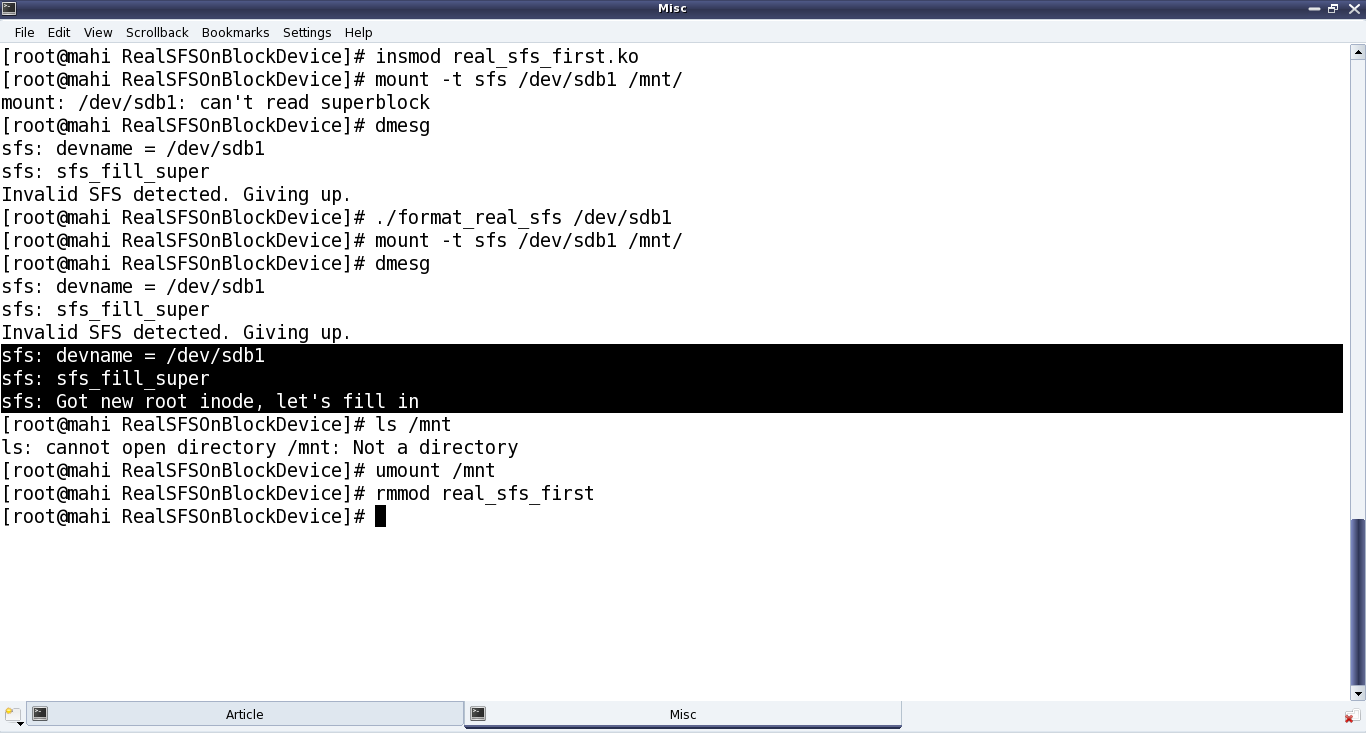
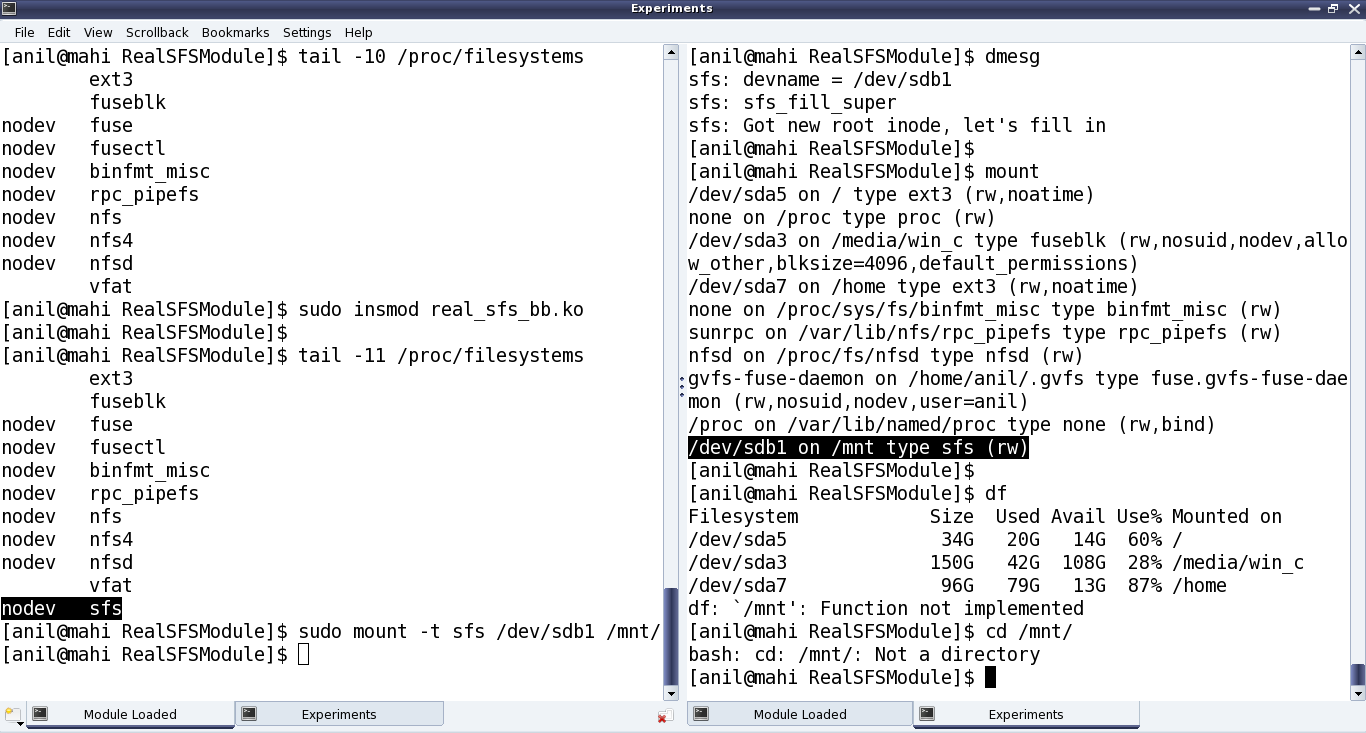
Once compiled using make, getting the real_sfs_first.ko driver, Pugs didn’t expect it to be way different from the previous real_sfs_bb.ko driver, but at least now it should be reading and verifying the underlying partition. And for that he first tried mounting the usual partition of a pen drive to get an “Invalid SFS detected” message in dmesg output; and then after formatting it. Note the same error of “Not a directory”, etc as in previous article, still existing – as anyways it is still very similar to the previous bare bone driver – the core functionalities yet to be implemented – just that it is now on a real block device partition. Figure 39 shows the exact commands for all these steps.

Figure 39: Connecting the SFS module with the pen drive partition

Figure 39: Connecting the SFS module with the pen drive partition

Note: “./format_real_sfs” and “mount” commands may take lot of time (may be in minutes), depending on the partition size. So, preferably use a partition, say less than 1MB.

With this important step of getting the file system module interacting with the underlying block device, the last step for Pugs would be to do the other transformations from browse_real_sfs.c and accordingly use them in the SFS module.

Twenty-fourth Article >>

   Send article as PDF   

Visualizing Graph Theory

This twenty-third article of the mathematical journey through open source, introduces graph theory with visuals using the graphs package of Maxima.

<< Twenty-second Article

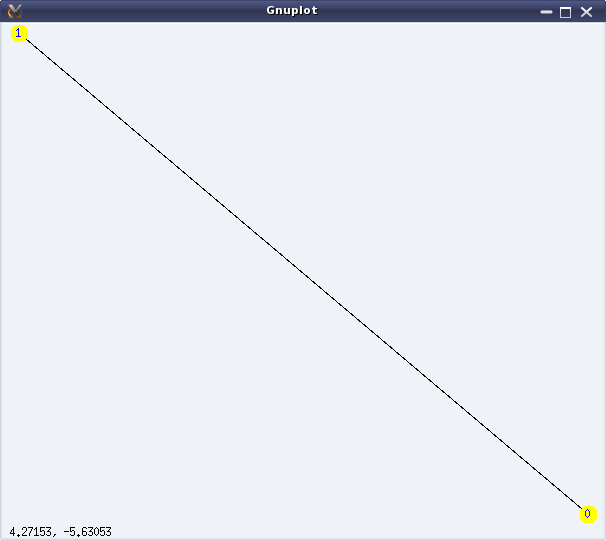
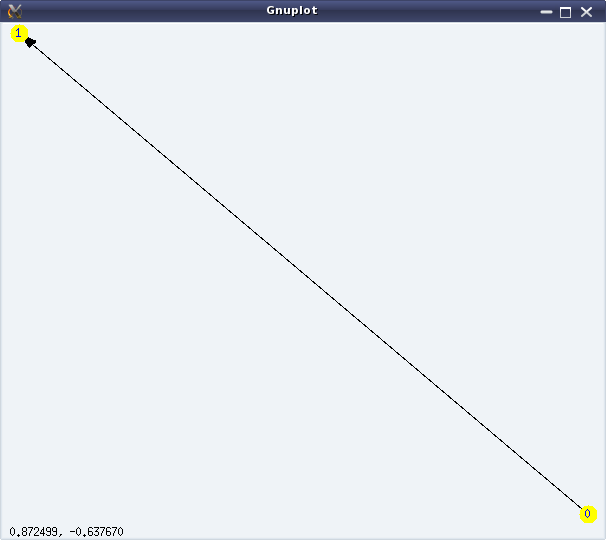
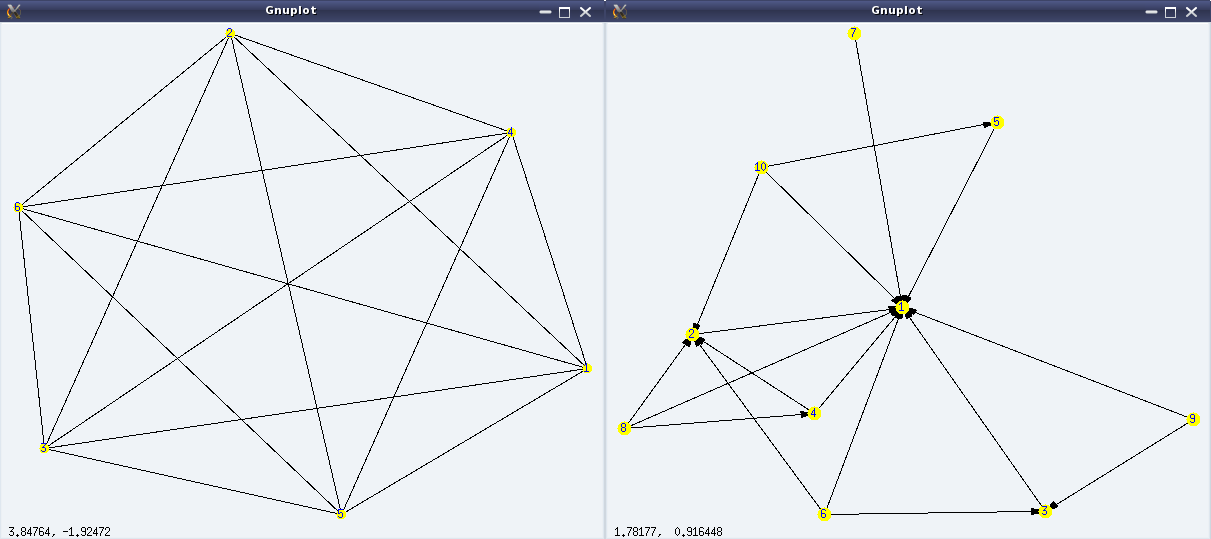
Graphs here refer to the structures formed using some points (or vertices), and some lines (or edges) connecting them. A simple example would be a graph with two vertices, say ‘0’ & ‘1’, and an edge between ‘0’ and ‘1’. If all the edges of a graph have a sense of direction from one vertex to another, typically represented by an arrow at their end(s), we call that a directed graph with directed edges. In such a case, we consider the edges to be not between two vertices but from one vertex to another vertex. Directed edges are also referred to as arcs. In the above example, we could have two directed arcs, one from ‘0’ to ‘1’, and another from ‘1’ to ‘0’. Figures 24 & 25 show an undirected and a directed graph, respectively.

Figure 24: Simple undirected graph

Figure 24: Simple undirected graph

Figure 25: Simple directed graph

Figure 25: Simple directed graph

Graph creation & visualization

Now, how did we get those figures? Using the graphs package of Maxima, which is loaded by invoking load(graphs) at the Maxima prompt. In the package, vertices are represented by whole numbers 0, 1, … and an edge is represented as a list of its two vertices. Using these notations, we can create graphs using the create_graph(<vertex_list>, <edge_list>[, directed]) function. And, then draw_graph(<graph>[, <option1>, <option2>, …]) would draw the graph pictorially. Code snippet below shows the same in action:

$ maxima -q
(%i1) load(graphs)$
...
0 errors, 0 warnings
(%i2) g: create_graph([0, 1], [[0, 1]])$
(%i3) dg: create_graph([0, 1], [[0, 1]], directed=true)$
(%i4) draw_graph(g, show_id=true, vertex_size=5, vertex_color=yellow)$
(%i5) draw_graph(dg, show_id=true, vertex_size=5, vertex_color=yellow)$

The “show_id=true” option draws the vertex numbers, and vertex_size and vertex_color draws the vertices with the corresponding size and colour.

Note that a graph without any duplicate edges and without any loops is called a simple graph. And, an edge from a vertex U to V is not duplicate of an edge from vertex V to U in a directed graph but is duplicate in an undirected graph. Maxima’s package supports only simple graphs, i.e. graphs without duplicate edges and loops.

A simple graph can also be equivalently represented by adjacency of vertices, meaning by lists of adjacent vertices for every vertex. print_graph(<graph>) exactly displays those lists. The following code demonstration, in continuation from the previous code, demonstrates that:

(%i6) print_graph(g)$

Graph on 2 vertices with 1 edges.
Adjacencies:
  1 :  0
  0 :  1
(%i7) print_graph(dg)$

Digraph on 2 vertices with 1 arcs.
Adjacencies:
  1 :
  0 :  1
(%i8) quit();

create_graph(<num_of_vertices>, <edge_list>[, directed]) is another way of creating a graph using create_graph(). Here, the vertices are created as 0, 1, …, <num_of_vertices> – 1. So, both the above graphs could equivalently be created as follows:

$ maxima -q
(%i1) load(graphs)$
...
0 errors, 0 warnings
(%i2) g: create_graph(2, [[0, 1]]);
(%o2)                     GRAPH(2 vertices, 1 edges)
(%i3) dg: create_graph(2, [[0, 1]], directed=true);
(%o3)                     DIGRAPH(2 vertices, 1 arcs)
(%i4) quit();

make_graph(<vertices>, <predicate>[, directed]) is another interesting way of creating a graph, based on vertex connectivity conditions specified by the <predicate> function. <vertices> could be an integer or a set/list of vertices. If it is a positive integer, then the vertices would be 1, 2, …, <vertices>. In any case, <predicate> should be a function taking two arguments of the vertex type and returning true or false. make_graph() creates a graph with the vertices specified as above, and with the edges between the vertices for which the <predicate> function returns true.

A trivial case would be, if the <predicate> always returns true, then it would create a complete graph, i.e. a simple graph where all vertices are connected to each other. Here are a couple of demonstrations of make_graph():

$ maxima -q
(%i1) load(graphs)$
...
0 errors, 0 warnings
(%i2) f(i, j) := true$
(%i3) g: make_graph(6, f);
(%o3)                   GRAPH(6 vertices, 15 edges)
(%i4) draw_graph(g, show_id=true, vertex_color=yellow)$
(%i5) f(i, j) := is(mod(i, j)=0)$
(%i6) g: make_graph(10, f, directed = true);
(%o6)                  DIGRAPH(10 vertices, 17 arcs)
(%i7) draw_graph(g, show_id=true, vertex_color=yellow, vertex_size=4)$
(%i8) quit();

Figures 26 shows the output graphs from the above code.

Figure 26: More simple graphs

Figure 26: More simple graphs

Graph varieties

One aware of graphs, would have known or at least heard of a variety of them. Here’s a list of some of them, available in Maxima’s graphs package (through functions):

  • Empty graph (empty_graph(n)) – Graph with a given n vertices but no edges
  • Complete graph (complete_graph(n)) – Simple graph with all possible edges for a given n vertices
  • Complete bipartite graph (complete_bipartite_graph(m, n)) – Simple graph with two set of vertices, having all possible edges between the vertices from the two sets, but with no edge between the vertices of the same set.
  • Cube graph (cube_graph(n)) – Graph representing an n-dimensional cube
  • Dodecahedron graph (dodecahedron_graph()) – Graph forming a 3-D polyhedron with 12 pentagonal faces
  • Cuboctahedron graph (cuboctahedron_graph()) – Graph forming a 3-D polyhedron with 8 triangular faces and 12 square faces
  • Icosahedron graph (icosahedron_graph()) – Graph forming a 3-D polyhedron with 20 triangular faces
  • Icosidodecahedron graph (icosidodecahedron_graph()) – Graph forming a 3-D uniform star polyhedron with 12 star faces and 20 triangular faces

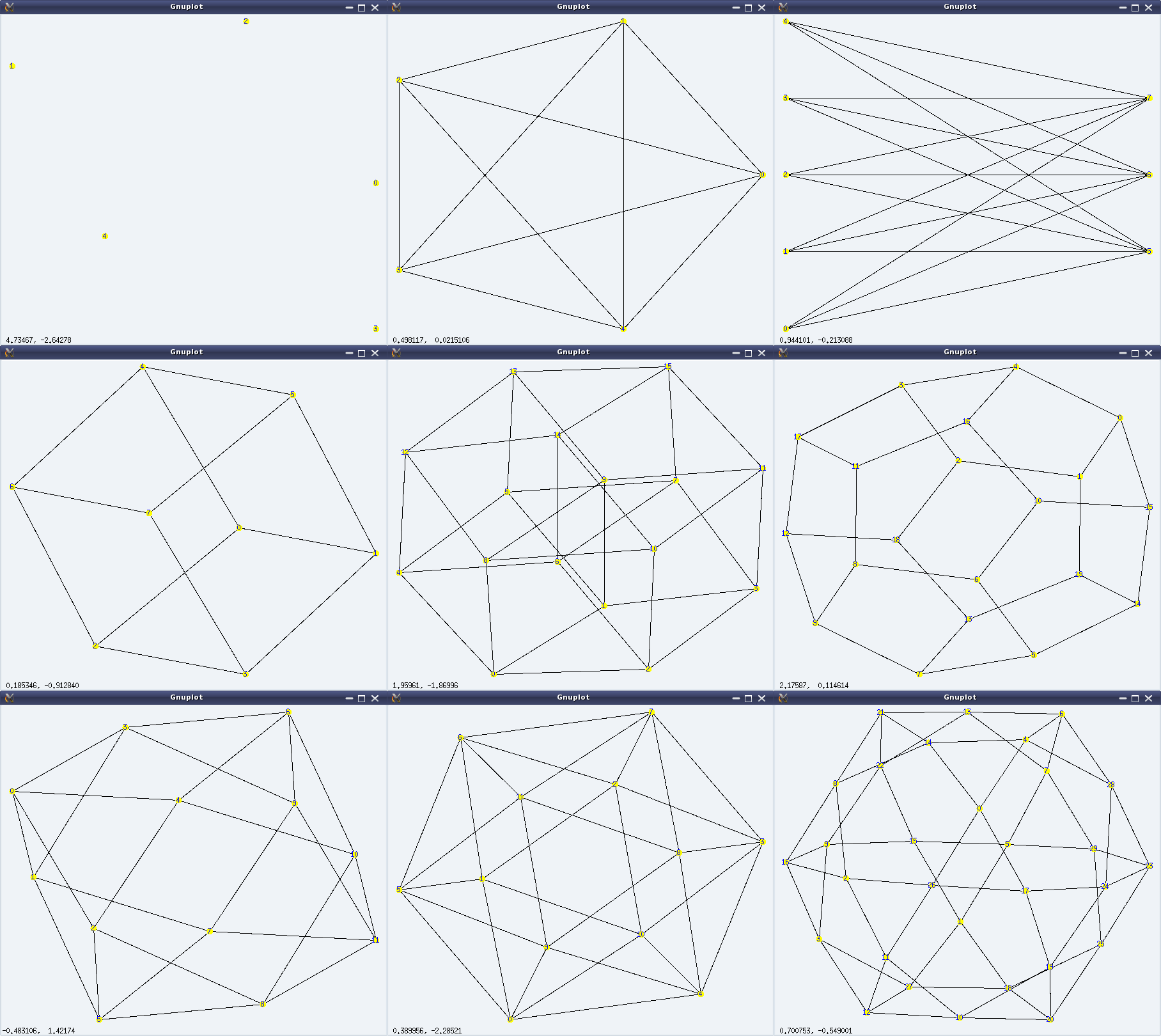
And here follows a demonstration of the above, along with the visuals (left to right, top to bottom) in Figure 27:

$ maxima -q
(%i1) load(graphs)$
...
0 errors, 0 warnings
(%i2) g: empty_graph(5);
(%o2)                     GRAPH(5 vertices, 0 edges)
(%i3) draw_graph(g, show_id=true, vertex_color=yellow)$
(%i4) g: complete_graph(5);
(%o4)                     GRAPH(5 vertices, 10 edges)
(%i5) draw_graph(g, show_id=true, vertex_color=yellow)$
(%i6) g: complete_bipartite_graph(5, 3);
(%o6)                     GRAPH(8 vertices, 15 edges)
(%i7) draw_graph(g, show_id=true, vertex_color=yellow)$
(%i8) g: cube_graph(3);
(%o8)                    GRAPH(8 vertices, 12 edges)
(%i9) draw_graph(g, show_id=true, vertex_color=yellow)$
(%i10) g: cube_graph(4);
(%o10)                   GRAPH(16 vertices, 32 edges)
(%i11) draw_graph(g, show_id=true, vertex_color=yellow)$
(%i12) g: dodecahedron_graph();
(%o12)                   GRAPH(20 vertices, 30 edges)
(%i13) draw_graph(g, show_id=true, vertex_color=yellow)$
(%i14) g: cuboctahedron_graph();
(%o14)                   GRAPH(12 vertices, 24 edges)
(%i15) draw_graph(g, show_id=true, vertex_color=yellow)$
(%i16) g: icosahedron_graph();
(%o16)                   GRAPH(12 vertices, 30 edges)
(%i17) draw_graph(g, show_id=true, vertex_color=yellow)$
(%i18) g: icosidodecahedron_graph();
(%o18)                   GRAPH(30 vertices, 60 edges)
(%i19) draw_graph(g, show_id=true, vertex_color=yellow)$
(%i20) quit();
Figure 27: Graph varieties

Figure 27: Graph varieties

Graph beauties

Graphs are really beautiful to visualize. Some of the many beautiful graphs, available in Maxima’s graphs package (through functions), are listed below:

  • Circulant graph (circulant_graph(n, [x, y, …])) – Graph with vertices 0, …, n-1, where every vertex is adjacent to its xth, yth, … vertices. Visually, it has a cyclic group of symmetries./li>
  • Flower graph (flower_snark(n)) – Graph like a flower with n petals and 4*n vertices
  • Wheel graph (wheel_graph(n)) – Graph like a wheel with n vertices
  • Clebsch graph (clebsch_graph()) – An another symmetrical graph beauty, named by J J Seidel
  • Frucht graph (frucht_graph()) – A graph with 12 vertices, 18 edges, and no nontrivial symmetries, such that every vertex have 3 neighbours. It is named after Robert Frucht
  • Grötzsch graph (grotzch_graph()) – A triangle-free graph with 11 vertices and 20 edges, named after Herbert Grötzsch
  • Heawood graph (heawood_graph()) – A symmetrical graph with 14 vertices and 21 edges, named after Percy John Heawood
  • Petersen graph (petersen_graph()) – A symmetrical graph with 10 vertices and 15 edges, named after Julius Petersen
  • Tutte graph (tutte_graph()) – A graph with 46 vertices and 69 edges, such that every vertex have 3 neighbours. It is named after W T Tutte

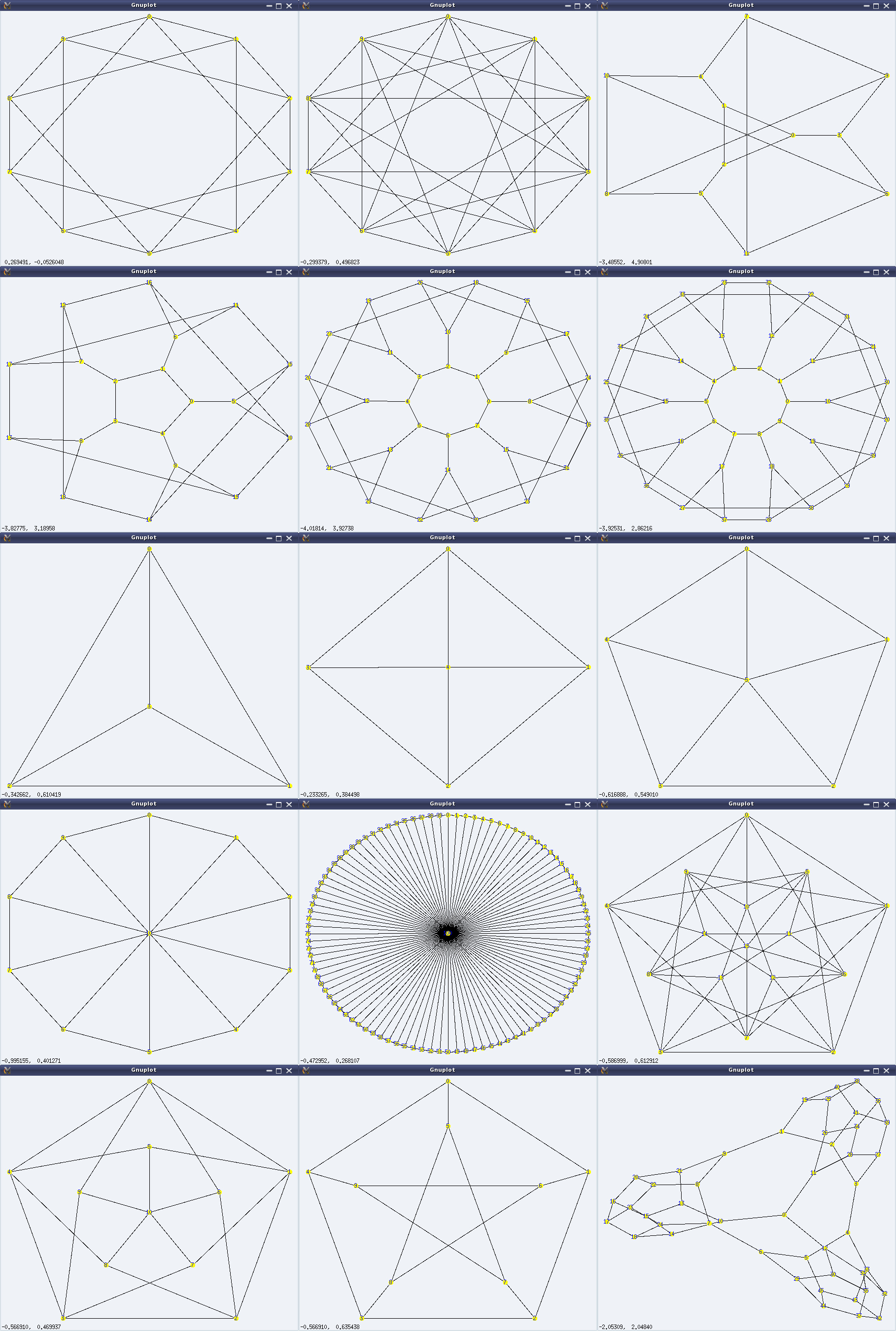
And here follows a demonstration of some of the above, along with the visuals (left to right, top to bottom) in Figure 28:

$ maxima -q
(%i1) load(graphs)$
...
0 errors, 0 warnings
(%i2) g: circulant_graph(10, [1, 3]);
(%o2)                   GRAPH(10 vertices, 20 edges)
(%i3) draw_graph(g, show_id=true, vertex_color=yellow)$
(%i4) g: circulant_graph(10, [1, 3, 4, 6]);
(%o4)                   GRAPH(10 vertices, 40 edges)
(%i5) draw_graph(g, show_id=true, vertex_color=yellow)$
(%i6) g: flower_snark(3);
(%o6)                   GRAPH(12 vertices, 18 edges)
(%i7) draw_graph(g, show_id=true, vertex_color=yellow)$
(%i8) g: flower_snark(5);
(%o8)                   GRAPH(20 vertices, 30 edges)
(%i9) draw_graph(g, show_id=true, vertex_color=yellow)$
(%i10) g: flower_snark(8);
(%o10)                   GRAPH(32 vertices, 48 edges)
(%i11) draw_graph(g, show_id=true, vertex_color=yellow)$
(%i12) g: flower_snark(10);
(%o12)                   GRAPH(40 vertices, 60 edges)
(%i13) draw_graph(g, show_id=true, vertex_color=yellow)$
(%i14) g: wheel_graph(3);
(%o14)                    GRAPH(4 vertices, 6 edges)
(%i15) draw_graph(g, show_id=true, vertex_color=yellow)$
(%i16) g: wheel_graph(4);
(%o16)                    GRAPH(5 vertices, 8 edges)
(%i17) draw_graph(g, show_id=true, vertex_color=yellow)$
(%i18) g: wheel_graph(5);
(%o18)                    GRAPH(6 vertices, 10 edges)
(%i19) draw_graph(g, show_id=true, vertex_color=yellow)$
(%i20) g: wheel_graph(10);
(%o20)                   GRAPH(11 vertices, 20 edges)
(%i21) draw_graph(g, show_id=true, vertex_color=yellow)$
(%i22) g: wheel_graph(100);
(%o22)                  GRAPH(101 vertices, 200 edges)
(%i23) draw_graph(g, show_id=true, vertex_color=yellow)$
(%i24) g: clebsch_graph();
(%o24)                   GRAPH(16 vertices, 40 edges)
(%i25) draw_graph(g, show_id=true, vertex_color=yellow)$
(%i26) g: grotzch_graph();
(%o26)                   GRAPH(11 vertices, 20 edges)
(%i27) draw_graph(g, show_id=true, vertex_color=yellow)$
(%i28) g: petersen_graph();
(%o28)                   GRAPH(10 vertices, 15 edges)
(%i29) draw_graph(g, show_id=true, vertex_color=yellow)$
(%i30) g: tutte_graph();
(%o30)                   GRAPH(46 vertices, 69 edges)
(%i31) draw_graph(g, show_id=true, vertex_color=yellow)$
(%i32) quit();
Figure 28: Graph beauties

Figure 28: Graph beauties

What next?

With all these visualizations, you may be wondering, what to do with these apart from just staring at them. Visualizations were just to motivate you, visually. In fact, every graph has a particular set of properties, which distinguishes it from the other. And, there is a lot of beautiful mathematics involved with these properties. If you are motivated enough, watch out for playing around with these graphs and their properties.

Twenty-fourth Article >>

   Send article as PDF   

The Semester Project – Part V: File System Module Template

This twenty-second article, which is part of the series on Linux device drivers, lays out a bare bone file system module.

<< Twenty-first Article

With the formatting of the pen drive, the file system is all set in the hardware space. Now, it is the turn to decode that using a corresponding file system module in the kernel space, and accordingly provide the user space file system interface, for it to be browsed like any other file systems.

The 5 sets of System Calls

Unlike character or block drivers, the file system drivers involve not just one structure of function pointers, but instead 5 structures of function pointers, for the various interfaces, provided by a file system. These are:

  • struct file_system_type – contains functions to operate on the super block
  • struct super_operations – contains functions to operate on the inodes
  • struct inode_operations – contains functions to operate on the directory entries
  • struct file_operations – contains functions to operate on the file data (through page cache)
  • struct address_space_operations – contains page cache operations for the file data

With these, there were many new terms for Pugs. He referred the following glossary to understand the various terms used above and later in the file system module development:

  • Page cache or Buffer cache: Pool of RAM buffers, each of page size (typically 4096 bytes). These buffers are used as the cache for the file data read from the underlying hardware, thus increasing the performance of file operations
  • Inode: Structure containing the meta data / information of a file, like permissions, owner, etc. Though file name is a meta data of a file, for better space utilization, in typical Linux file systems, it is not kept in inode, instead in something called directory entries. Collection of inodes, is called an inode table
  • Directory entry: Structure containing the name and inode number of a file or directory. In typical Linux based file systems, a collection of directory entries for the immediate files and directories of say directory D, is stored in the data blocks of the directory D
  • Super block: Structure containing the information about the various data structures of the file systems, like the inode tables, … Basically the meta meta data, i.e. meta data for the meta data
  • Virtual File System (VFS): Conceptual file system layer interfacing the kernel space to user space in an abstract manner, showing “everything” as a file, and translating their operations from user to the appropriate entity in the kernel space

Each one of the above five structures contains a list of function pointers, which needs to be populated depending on what all features are there or to be supported in the file system (module). For example, struct file_system_type may contain system calls for mounting and unmounting a file system, basically operating on its super block; struct super_operations may contain inode read/write system calls; struct inode_operations may contain function to lookup directory entries; struct file_operations may generically operate on the page cached file data, which may in turn invoke page cache operations, defined in the struct address_space_operations. For these various operations, most of these functions will then interface with the corresponding underlying block device driver to ultimately operate with the formatted file system in the hardware space.

To start with Pugs laid out the complete framework of his real SFS module, but with minimal functionality, good enough to compile, load, and not crash the kernel. He populated only the first of these five structures – the struct file_system_type; and left all the others empty. Here’s the exact code of the structure definitions:

#include <linux/fs.h> /* For system calls, structures, ... */

static struct file_system_type sfs;
static struct super_operations sfs_sops;
static struct inode_operations sfs_iops;
static struct file_operations sfs_fops;
static struct address_space_operations sfs_aops;
#include <linux/version.h> /* For LINUX_VERSION_CODE & KERNEL_VERSION */

static struct file_system_type sfs =
{
	name: "sfs", /* Name of our file system */
#if (LINUX_VERSION_CODE < KERNEL_VERSION(2,6,38))
	get_sb:  sfs_get_sb,
#else
	mount:  sfs_mount,
#endif
	kill_sb: kill_block_super,
	owner: THIS_MODULE
};

Note that before Linux kernel version 2.6.38, the mount function pointer was referred as get_sb, and also, it used to have slightly different parameters. And hence, the above #if for it to be compatible at least across 2.6.3x and possibly with 3.x kernel versions – no guarantee for others. Accordingly, the corresponding functions sfs_get_sb() and sfs_mount(), are also #if’d, as follows:

#include <linux/kernel.h> /* For printk, ... */

if (LINUX_VERSION_CODE < KERNEL_VERSION(2,6,38))
static int sfs_get_sb(struct file_system_type *fs_type, int flags,
			const char *devname, void *data, struct vfsmount *vm)
{
	printk(KERN_INFO "sfs: devname = %s\n", devname);

	/* sfs_fill_super this will be called to fill the super block */
	return get_sb_bdev(fs_type, flags, devname, data, &sfs_fill_super, vm);
}
#else
static struct dentry *sfs_mount(struct file_system_type *fs_type,
					int flags, const char *devname, void *data)
{
	printk(KERN_INFO "sfs: devname = %s\n", devname);

	/* sfs_fill_super this will be called to fill the super block */
	return mount_bdev(fs_type, flags, devname, data, &sfs_fill_super);
}
#endif

The only difference in the above 2 functions is that in the later, the VFS mount point related structure has been removed. The printk() in there would display the underlying partition’s device file which the user is going to mount, basically the pen drive’s SFS formatted partition. get_sb_bdev() and mount_bdev() are generic block device mount functions for the respective kernel versions, defined in fs/super.c and prototyped in <linux/fs.h>. Pugs also used them, as most other file system writers do. Are you wondering: Does all file system mount a block device, the same way? Most of it yes, except the part where the mount operation needs to fill in the VFS’ super block structure (struct super_block), as per the super block of the underlying file system – obviously that most probably would be different. But then how does it do that? Observe carefully, in the above functions, apart from passing all the parameters as is, there is an additional parameter sfs_fill_super, and that is Pugs’ custom function to fill the VFS’ super block, as per the SFS file system.

Unlike the mount function pointer, the unmount function pointer has been same (kill_sb) for quite some kernel versions; and in unmounting, there is not even the minimal distinction required across different file systems. So, the generic block device unmount function kill_block_super() has been used directly as the function pointer.

In sfs_fill_super(), Pugs is ideally supposed to read the super block from the underlying hardware-space SFS, and then accordingly translate and fill that into VFS’ super block to enable VFS to provide the user space file system interface. But he is yet to figure that out, as how to read from the underlying block device, in the kernel space. Information of which block device to use, is already embedded into the super_block structure itself, obtained from the user issuing the mount command. But as Pugs decided to get the bare bone real SFS up, first, he went ahead writing this sfs_super_fill() function also as a hard-coded fill function. And with that itself, he registered the Simula file system with the VFS. As any other Linux driver, here’s the file system driver’s constructor and destructor for that:

#include <linux/module.h> /* For module related macros, ... */

static int __init sfs_init(void)
{
	int err;

	err = register_filesystem(&sfs);
	return err;
}

static void __exit sfs_exit(void)
{
	unregister_filesystem(&sfs);
}

module_init(sfs_init);
module_exit(sfs_exit);

Both register_filesystem() and unregister_filesystem() takes pointer to the the struct file_system_type sfs (filled above), as their parameter, to respectively register and unregister the file system described by it.

Hard-coded SFS super block and root inode

And yes, here’s the hard-coded sfs_fill_super() function:

#include "real_sfs_ds.h" /* For SFS related defines, data structures, ... */

static int sfs_fill_super(struct super_block *sb, void *data, int silent)
{
	printk(KERN_INFO "sfs: sfs_fill_super\n");

	sb->s_blocksize = SIMULA_FS_BLOCK_SIZE;
	sb->s_blocksize_bits = SIMULA_FS_BLOCK_SIZE_BITS;
	sb->s_magic = SIMULA_FS_TYPE;
	sb->s_type = &sfs; // file_system_type
	sb->s_op = &sfs_sops; // super block operations

	sfs_root_inode = iget_locked(sb, 1); // obtain an inode from VFS
	if (!sfs_root_inode)
	{
		return -EACCES;
	}
	if (sfs_root_inode->i_state & I_NEW) // allocated fresh now
	{
		printk(KERN_INFO "sfs: Got new root inode, let's fill in\n");
		sfs_root_inode->i_op = &sfs_iops; // inode operations
		sfs_root_inode->i_mode = S_IFDIR | S_IRWXU |
			S_IRGRP | S_IXGRP | S_IROTH | S_IXOTH;
		sfs_root_inode->i_fop = &sfs_fops; // file operations
		sfs_root_inode->i_mapping->a_ops = &sfs_aops; // address operations
		unlock_new_inode(sfs_root_inode);
	}
	else
	{
		printk(KERN_INFO "sfs: Got root inode from inode cache\n");
	}

#if (LINUX_VERSION_CODE < KERNEL_VERSION(3,4,0))
	sb->s_root = d_alloc_root(sfs_root_inode);
#else
	sb->s_root = d_make_root(sfs_root_inode);
#endif
	if (!sb->s_root)
	{
		iget_failed(sfs_root_inode);
		return -ENOMEM;
	}

	return 0;
}

As mentioned earlier, this function is basically supposed to read the underlying SFS super block, and accordingly translate and fill the struct super_block, pointed to by its first parameter sb. So, understanding it is same as understanding the minimal fields of the struct super_block, which are getting filled up. The first three are the block size, its logarithm base 2, and the type/magic code of the Simula file system. As Pugs codes further, we shall see that once he gets the super block from the hardware space, he would instead get these values from that super block, and more importantly verify them, to ensure that the correct partition is being mounted.

After that, the various structure pointers are pointed to their corresponding structure of the function pointers. Last but not least, the root inode’s pointer s_root is pointed to the struct inode structure, obtained from VFS’ inode cache, based on the inode number of root – right now, which has been hard coded to 1 – it may possibly change. If the inode structure is obtained fresh, i.e. for the first time, it is then filled as per the underlying SFS’ root inode’s content. Also, the mode field is being hard-coded to “drwxr-xr-x“. Apart from that, the usual structure pointers are being initialized by the corresponding structure addresses. And finally, the root’s inode is being attached to the super block using d_alloc_root() or d_make_root(), as per the kernel version.

All the above code pieces put in together as the bare bone real_sfs_bb.c, along with the real_sfs_ds.h (based on the same file created earlier), and a supporting Makefile are available from rsfsbb_code.tbz2.

Bare bone SFS module in action

Once compiled using make, getting the real_sfs_bb.ko driver, Pugs did his usual unusual experiments, shown as in Figure 38.

Figure 38: Bare-bone real SFS experiments

Figure 38: Bare-bone real SFS experiments

Pugs’ experiments (Explanation of Figure 38):

  • Checked the kernel window /proc/filesystems for the kernel supported file systems
  • Loaded the real_sfs_bb.ko driver
  • Re-checked the kernel window /proc/filesystems for the kernel supported file systems. Now, it shows sfs listed at the end
  • Did a mount of his pen drive partition /dev/sdb1 onto /mnt using the sfs file system. Checked the dmesg logs on the adjacent window. (Keep in mind, that right now, the sfs_fill_super() is not really reading the partition, and hence not doing any checks. So, it really doesn’t matter as to how the /dev/sdb1 is formatted.) But yes, the mount output shows that it is mounted using the sfs file system

Oops!!! But df output shows “Function not implemented”, cd gives “Not a directory”. Aha!! Pugs haven’t implemented any other functions in any of the other four function pointer structures, yet. So, that’s expected.

Note: The above experiments are using “sudo”. Instead one may get into root shell and do the same without a “sudo”.

Okay, so no kernel crashes, and a bare bone file system in action – Yippee. Ya! Ya! Pugs knows that df, cd, … are not yet functional. For that, he needs to start adding the various system calls in the other (four) function pointer structures to be able to do cool-cool browsing, the same way as is done with all other file systems, using the various shell commands. And yes, Pugs is already onto his task – after all he needs to have a geeky demo for his final semester project.

Twenty-third Article >>

   Send article as PDF   
Google Circle
Join my Circle on Google+

Plugin by Social Author Bio